GPS Maps Voice Navigation
MINDBYTE STUDIOSTravel & Local
4.1236.00 Reviews
- Version
- 6.3.4
- Installs
- 1.00M
- Age Rating
- Everyone
Screenshots
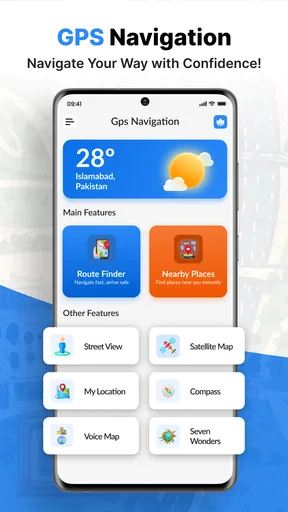
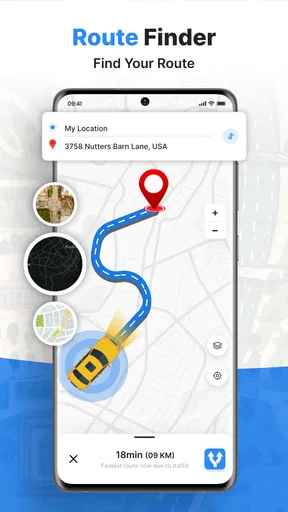
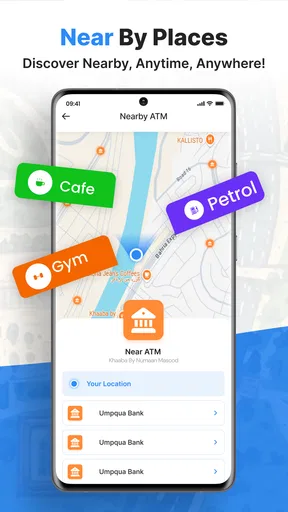
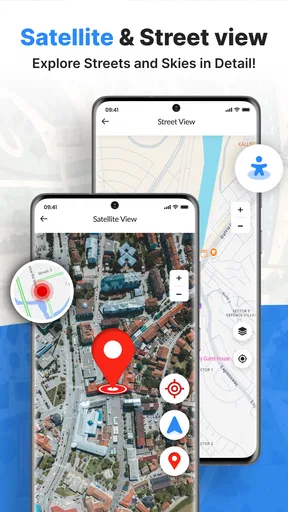
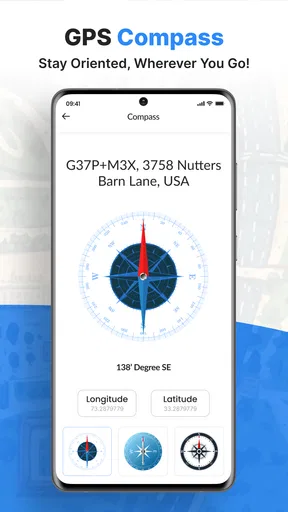
Our Review of GPS Maps Voice Navigation
 Analysis by Appyee
When I try a navigation app, the first few trips are easy to judge: can I find a destination, understand the directions, and recover if I take a wrong turn? The harder question is whether it still earns a place on my phone after that initial novelty wears off. GPS Maps Voice Navigation, made by Green Lines, is a free travel and local app with a clear everyday purpose: help me orient myself and get where I am going. Its appeal is straightforward, but whether it becomes a lasting habit depends on how well it fits the routes I actually take.
Getting Started with GPS Maps Voice Navigation
First things first, let's talk about getting this app up and running. It's available on both Android and iOS, so all you need to do is head over to your app store and download it. Installation is a breeze and within minutes, you're ready to embark on your next adventure.
Once you've got it installed, the app greets you with a clean, intuitive interface. No clutter, no fuss—just straightforward navigation. You can input your destination manually or simply speak it out loud, thanks to the voice input feature. It's perfect for those times when your hands are full or you're behind the wheel.
The First Week: A Simple Test of Everyday Use
In the first week, I would judge it less by how impressive it looks and more by whether it reduces small moments of uncertainty. Try it on a familiar commute, then on an errand in a neighborhood you do not know well. Familiar roads show whether the basic guidance feels comfortable; the unfamiliar trip tells you more about how useful the map and spoken directions are when you cannot rely on memory.
Voice search is most helpful before moving, when I can say or enter a destination without repeatedly tapping around. If I am driving, I would set the destination while parked and check the route before pulling away. Voice guidance can reduce the need to look down, but it is not a reason to handle a phone while driving. For a passenger, a spoken destination can also make it easier to plan a stop without taking over the driver’s attention.
A practical first-week test is to use one destination in different ways: type a full address, try speaking a place name, and compare the result with what you intended. Names can be ambiguous, and a speech-recognized destination deserves a quick check before departure. This small habit is more useful than assuming the first match is always the right entrance or branch.
Features That Stand Out
Now, let's dive into some of the features that make GPS Maps Voice Navigation a standout choice. One of the coolest things about this app is the real-time traffic updates. It keeps you informed about congestion, accidents, and road closures, ensuring you always take the quickest route.
The voice guidance is another gem. You get clear, turn-by-turn directions, which means no more frantically glancing at your phone while driving. The voice is pleasant, not robotic, making your journey feel like a breeze.
For those who love a bit of personalization, the app offers various map views. Whether you prefer a satellite view or a traditional map look, you can customize it to your liking. Plus, it supports offline maps, which is a lifesaver when you're in areas with spotty internet.
Small Habits That Make the Map More Useful
Map choice is not just decoration. I find a standard map view easier to read when I need to understand street names and nearby turns at a glance. Satellite imagery can help me recognize a large building or the shape of a complex, but it can also make labels harder to spot. I would switch views for a specific orientation problem, then return to the clearer view for normal navigation rather than leaving a less readable setting on by default.
Offline maps are valuable when a route passes through a place with unreliable service, but they work best as preparation rather than rescue. Before leaving, I would check that the relevant map area is available offline and make sure the route destination is correct. Offline access can help with the map itself, but it should not be treated as a guarantee that live traffic information or every connected function will be available without an internet connection.
There is also a useful trade-off between choosing a route quickly and reviewing it first. When I know the area, I may be happy to follow the suggested direction. In a new town, I would look at the route before starting, especially if a destination might have several entrances or sit beside a larger road. A quick glance at the route can prevent a wrong turn caused by assuming the map has selected the exact place I had in mind.
User Experience and Performance
So, how does it perform in real-world scenarios? Pretty darn well, if you ask me. The app is fast, responsive, and doesn't drain your phone's battery like some other navigation apps do. It's lightweight, meaning it won't hog your phone's memory.
One thing I love is the minimal lag when recalculating routes. If you miss a turn, it quickly adjusts and provides an alternative route. This quick recalibration is crucial, especially when you're in unfamiliar territory.
On top of that, the app integrates seamlessly with your contacts and calendar. So, if you're heading to a meeting, you can pull up the address directly from your event details. It's these little conveniences that make the app a joy to use.
From a One-Off Download to a Monthly Routine
The recurring value of a navigation app is practical rather than exciting. I am more likely to keep one installed if I reach for it on routine occasions: a new appointment, a detour, a weekend drive, or a trip where I do not want to rely on memory. GPS Maps Voice Navigation makes most sense for someone who wants a direct route aid in those moments, not an app to browse for entertainment or plan an entire holiday.
Imagine leaving work for an appointment at an unfamiliar address while traffic is building. I would enter the destination before setting off, check the selected place, and let voice directions handle the turns while I focus on driving. If I miss one, the route recalculation can keep the mistake from becoming a reason to panic. If the destination is in a patchy-signal area, preparing the offline map beforehand makes the trip less dependent on a steady connection. That is a realistic combination of features, but it still relies on the user doing a little preparation.
For people who drive the same route every day, the app may be less useful once they know the roads. It can still help when traffic or road conditions change, but opening navigation for a familiar journey is not automatically better than using local knowledge. I would keep it as a tool for uncertainty rather than insist on following it for every short trip.
How It Fits Beside Other Navigation Choices
Most people already have a map or navigation option on their phone, so installing another one needs a reason. Compared with relying on memory, this app offers spoken turn guidance and a route to follow when streets are unfamiliar. Compared with a general-purpose map service, its core appeal is the focused combination of GPS maps and voice navigation, rather than a promise that it will replace every travel tool a person uses.
If your priority is discovering restaurants, checking extensive place information, organizing a multi-stop holiday, or coordinating a group itinerary, a broader map or travel-planning service may suit you better. If what you want is help getting from your current location to a destination, especially with spoken directions and offline-map support, GPS Maps Voice Navigation is easier to evaluate on its own merits. I would not choose between apps based only on which has the most options; the better fit is the one whose route guidance and destination handling work well for your usual journeys.
It is also sensible to keep a backup plan for trips where being offline would have serious consequences. An offline map can be reassuring, but I would still note the destination address and check the route before setting out. No navigation app should replace attention to road signs, safe driving, or a sensible decision to stop somewhere safe if the route becomes confusing.
Maintenance, Fatigue, and What to Check
A navigation app asks for more maintenance than its first installation suggests. Maps and app versions need to stay current enough for the journeys I take, and offline areas need attention if I plan to depend on them. GPS Maps Voice Navigation is at version 6.1.6, and the app was released on February 17, 2025. Those details are useful context, but the practical habit is simple: check for updates when convenient, and refresh any offline preparation before a trip where connectivity may be unreliable.
Navigation also has a quiet maintenance burden: keeping destination details accurate. A calendar event can save typing, but it is worth checking the address rather than assuming the event contains the correct location. Contacts can be handy for visiting someone, yet the saved address may not be the entrance you need. A quick verification can matter more than a polished interface, particularly when a building has a large campus, multiple access roads, or a drop-off point separate from its mailing address.
The main source of fatigue is not necessarily a technical problem; it is being asked to follow a voice and screen when you already know the route or when the instruction arrives at a stressful moment. I would keep the phone mounted safely, set the destination before moving, and treat guidance as assistance rather than authority. In dense streets, a spoken turn may still leave a choice between nearby lanes or entrances, so slowing down and using road signs is the calmer response.
Another consideration is cost. The app is free to install, but it includes in-app purchases priced from $0.99 to $119.99 per item. I would start with the free experience and decide whether anything offered inside is genuinely useful before spending. That range is broad enough that users should check the exact item and price shown in the app rather than assume every feature or purchase is inexpensive. A basic navigation need does not, by itself, make a paid add-on necessary.
Who Is Likely to Keep It Installed?
I can see this app fitting drivers who want clear spoken directions, people who visit unfamiliar addresses, and travelers who value having offline map support ready for areas with inconsistent internet. It may also help someone who finds a large, feature-heavy mapping service distracting and wants to focus on the core task of getting to a destination. The uncomplicated starting point is a plus if the person using it does not want to learn a complicated planning workflow.
I would be more cautious about recommending it as the only travel tool to someone who depends on detailed local discovery, extensive itinerary building, or reliable guidance in situations where a wrong turn has significant consequences. Those users should compare it with services designed around their particular needs and keep a backup. Likewise, if you rarely travel beyond roads you already know, the benefit may not justify another app on your home screen.
The audience rating is strong: GPS Maps Voice Navigation averages 4.8 from around 1.4 thousand ratings, with over 1 million installs. It is rated for Everyone. Those figures suggest that many people have tried it and that the experience is well received, but they cannot tell me whether it suits my routes, phone habits, or preferred map style. I would treat them as a reason to consider the app, not as a substitute for testing it on an ordinary trip.
Why Choose GPS Maps Voice Navigation?
By now, you might be wondering why you should choose this app over others. Well, apart from its stellar performance and features, it's the ease of use that truly wins me over. You don't need to be tech-savvy to navigate through the app. Everything is laid out clearly, making it accessible for everyone.
The app also shines with its regular updates. The developers are constantly improving the app based on user feedback, which means it's only going to get better. And let's not forget the community support. If you ever run into issues, there's a helpful community and support team ready to assist.
In a world where navigation apps are a dime a dozen, GPS Maps Voice Navigation manages to carve out its niche with its reliability and user-friendly design. Whether you're a frequent traveler or someone who simply wants a reliable guide for daily commutes, this app has got you covered.
For me, the deciding test is whether the app keeps solving a recurring problem without demanding too much attention in return. If I travel to unfamiliar places often, voice directions, route recalculation, map views, and offline support can earn it a regular place. If my needs are mostly about discovering businesses or coordinating complex travel, I would use a more specialized alternative instead of expecting this one to do everything.
One practical question is whether it costs anything to try: the app itself is free, while optional in-app items have their own prices. Another is whether it is suitable for a broad audience; its Everyone content rating makes it appropriate for general use, though safe driving habits still matter. On Android, the stated minimum operating system is 8.0. I would check compatibility on the device before planning a trip around any navigation app, then test the route at a low-stakes moment rather than first opening it when already rushed.
In conclusion, if you're on the hunt for a dependable navigation app that won't let you down, give GPS Maps Voice Navigation a try. It's like having a co-pilot who never gets tired, never gets lost, and always has your back. Happy navigating!
Verdict
Strengths of GPS Maps Voice Navigation
- Intuitive voice commands enhance hands-free navigation.
- Real-time traffic updates optimize travel routes.
- Offline maps allow usage without data connection.
- Customizable map views for personalized experience.
- Supports multiple languages for global users.
Limitations of GPS Maps Voice Navigation
- Heavy battery usage during prolonged navigation.
- Occasional inaccuracies in real-time traffic data.
- Ads can be intrusive in the free version.
- Limited offline map availability in some regions.
- Voice navigation may lag in areas with poor GPS.
Other Releases by MINDBYTE STUDIOS
View All
Cloud Storage Drive Backup app
Tools3.9
Similar Picks in This Category
View All
Google Maps
Google LLC3.4

Google Maps Go
Google LLC4.1

Booking.com: Hotels & Travel
Booking.com Hotels & Vacation Rentals4.8

Google Earth
Google LLC3.8

Skyscanner Flights Hotels Cars
Skyscanner Ltd4.8

trivago: Compare hotel prices
trivago N.V.4.4
Frequently Asked Questions
What features does GPS Maps Voice Navigation offer?
GPS Maps Voice Navigation provides real-time turn-by-turn navigation, voice guidance, and offline maps for convenient travel without using data. It includes features like traffic updates, speed limit alerts, and points of interest. This makes it ideal for both urban commutes and long road trips.
Is GPS Maps Voice Navigation available offline?
Yes, GPS Maps Voice Navigation allows users to download maps for offline use. This feature is particularly beneficial for areas with limited connectivity, ensuring uninterrupted navigation. Users can select specific regions or entire countries to download, depending on their travel needs.
How accurate is the voice guidance in GPS Maps Voice Navigation?
The voice guidance in GPS Maps Voice Navigation is highly accurate, providing timely and clear instructions. It adjusts based on traffic conditions and reroutes if necessary. Users can choose from different voice options to suit their preferences, making the navigation experience more personalized.
Does GPS Maps Voice Navigation consume a lot of battery?
While GPS Maps Voice Navigation does use GPS and other resources, it is optimized to minimize battery drain. Users can further conserve battery by downloading maps for offline use and adjusting screen brightness. Background usage is also managed to prevent excessive battery consumption.
Are there any subscription fees for using GPS Maps Voice Navigation?
GPS Maps Voice Navigation offers both free and premium versions. The free version includes basic navigation features, while the premium version provides additional benefits like ad-free experience, advanced traffic data, and specialized maps. Users can choose a plan based on their needs.
